Migrating Applications to the Cloud: A Step-by-Step Guide
A cutover goes green, the ticket closes, and the team moves on to the next thing. Six weeks later the month-end report doesn't run, the cloud bill lands at a number nobody budgeted for, and the only person who understood the nightly batch has left. Nothing failed loudly. The deployment worked. The operating model around it never existed.
That gap separates a migration that holds from one that keeps generating incidents. Migrating applications to the cloud is really two projects stacked on each other: getting the workload to run on metered, elastic infrastructure, and proving that someone owns it, can measure it, and can reverse it when production disagrees with the test plan.
The move itself is mainstream. Eurostat reported that 45.2% of enterprises in the European Union purchased cloud computing services in 2023, up 4.2 percentage points on 2021, ranging from 77.6% of large enterprises to 41.7% of small businesses, with 26.1% buying computing platforms for application development, testing or deployment (Eurostat). What counts as cloud was settled long before that, when NIST published a definition built on five essential characteristics, including resource pooling and rapid elasticity, plus three service models and four deployment models (NIST). Those two characteristics are why a cloud-hosted application can grow into demand instead of being capped by hardware bought in advance. A fixed set of virtual machines with a monthly invoice is outsourced hosting, not a cloud architecture.
The test: if nobody can name the person who owns the cloud bill and the rollback decision, the migration isn't finished, whatever the dashboard says.
Table of Contents
- Assess Workloads and Choose a Migration Path
- Run a Pre-Migration Audit Step by Step
- Keep Sensitive Data in the Right Jurisdiction
- Set Governance and Pass the Go or No-Go Gate
- Test, Migrate in Waves and Set Rollback Triggers
- Who Owns the Application After Go-Live
Assess Workloads and Choose a Migration Path
| Migration path | Share of migrations | Average duration | Reported cost reduction | Reported performance change |
|---|---|---|---|---|
| Rehost (lift-and-shift) | 39.64% | 5.94 months | 40.06% | Not reported in the study |
| Re-platform | 38.55% | 6.10 months | 38.12% | Not reported in the study |
| Re-engineer | 21.82% | 6.28 months | 42% | 141.66% improvement |
Those figures come from a study of 275 successful cloud migrations published in the Eastern-European Journal of Enterprise Technologies, which also sets the working order for the whole programme: audit first, classify each workload, pilot something low risk, validate function, performance, security and rollback, then cut over in waves with monitoring afterwards.
Rehosting is the biggest bucket and the cheapest to execute. It accounted for 39.64% of migrations, averaged 5.94 months, and still delivered a 40.06% cost reduction, mostly from retiring owned hardware and the licences attached to it. What it doesn't buy is elasticity or speed. You move the same architecture, the same chatty service calls and the same 2 a.m. batch onto metered infrastructure, and you inherit the same ceiling with a different invoice layout.
Re-platforming covered 38.55% at 6.10 months for a 38.12% cost reduction. This is the swap of one self-managed component for a managed one: Postgres to a managed database, a hand-built cache to a managed cache, a custom scheduler to the platform's queue. You give up control of version upgrades and tuning in exchange for deleting a patching rota.
Re-engineering is the smallest group at 21.82% and the longest at 6.28 months, but it carries the strongest results: 42% cost reduction and a 141.66% performance improvement. Here you fix the thing that blocked you, splitting a monolithic batch into queue-driven workers, moving session state out of the app tier, or sharding the one table every query hits.
A decision rule for every application
- Rehost when the application is stable, changes rarely, has no scaling bottleneck you can name, and most of its running cost sits in licences rather than compute.
- Re-platform when one or two components map cleanly onto a managed service and the rest can stay where it is. Most portfolios land here, because the database is usually the piece a team least wants to operate itself.
- Re-engineer when the cost curve bends with volume, traffic is spiky, or there's a bottleneck the team already complains about every week.
- Retire anything with no named owner and no traffic. Deleting a workload is the cheapest migration available.
The common mistake is choosing lift-and-shift because it's the fastest start. Fastest to start is not fastest to finish, and it's almost never fastest to pay back. The same study recommends holding objective baseline metrics throughout and picking re-engineering where performance or elasticity gains justify the extra delivery complexity, and using outlier detection on the audit data so two unusual applications don't distort the cost estimate for the whole portfolio.
Before you plan a single wave, every application in the inventory should carry exactly one path and a named owner. A portfolio where a third of the rows say "decide later" stalls in the first cutover planning meeting. When you need to explain the sequence to people outside engineering, a plain walkthrough of migrating applications to the cloud travels better than an internal design document. And if part of the estate is event-driven functions, read the upsides and drawbacks of serverless technology before labelling those workloads re-platform, because cold starts and per-invocation billing change the maths.
Run a Pre-Migration Audit Step by Step
An audit isn't a documentation exercise. It's the only stage where you can still change your mind cheaply, and it's the one most portfolios skip because the pressure to show progress is strongest at the start.
The sequence below runs in order, because each step feeds the next.
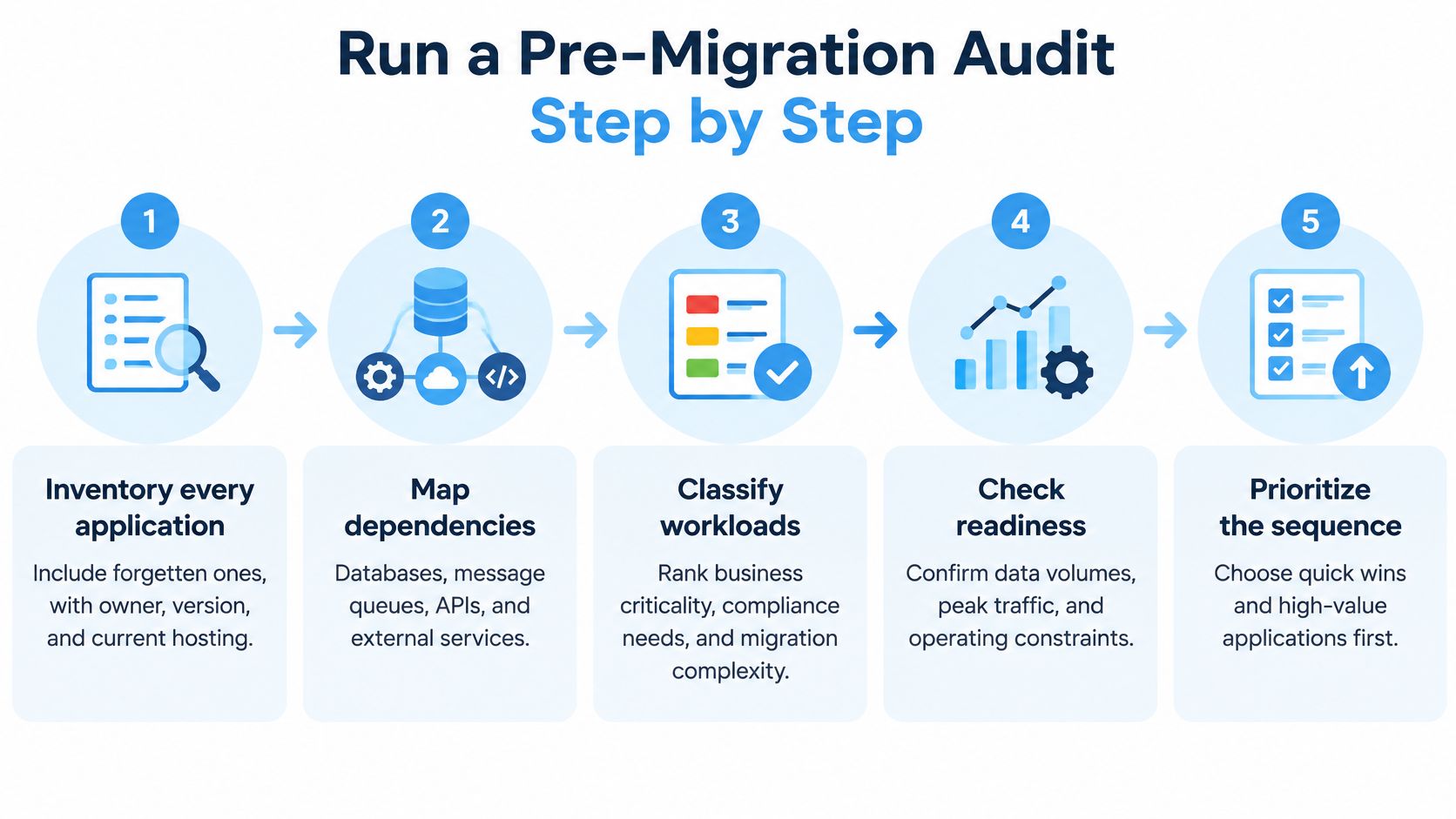
- Inventory every application, including the forgotten ones. Reconcile four sources: the asset register, the billing export, the DNS zone and the on-call rota. Each one misses something the others catch. For every row, record an owner by name, the version in production and where it runs today.
- Map dependencies outward. Databases, message queues, third-party APIs, scheduled jobs, certificates and the records that point at the host. Hidden dependencies break first on cutover night, and they break in ways no test plan covered: a partner service reached by hardcoded address, a certificate pinned to a hostname, a cron job living on a machine nobody owns.
- Capture performance baselines across two normal business cycles. p95 latency, peak CPU and memory, error rate, and the daily and monthly traffic shape. Without a baseline you can't prove the move improved anything, and you can't set a rollback threshold that means anything either.
- Document data flows in both directions. Where data enters, where it's transformed, where it rests, and which of those stores carries a residency obligation. If a database cutover involves change data capture, the pre-work overlaps with avoiding data loss in migrations, so do it before the wave plan rather than during the wave.
- Record the compliance constraint per workload. One application may touch patient records, another only anonymised telemetry. Treating them identically either wastes money or drops a control.
- Estimate total cost. Current hardware and depreciation, licences, staff hours spent keeping the lights on, projected cloud spend and the one-off engineering cost. Flag outliers, because a single GPU-heavy workload or an unusually large storage footprint will skew the average and make an entire business case look wrong.
The failure to watch for is the reporting job that runs at 2 a.m. on the first of every month. It never appears in the inventory because it serves no users and exposes no health check, and finance set it up years ago. The first cutover stops it without anyone noticing until the month-end pack is missing. A scheduled-jobs sweep in step two is what catches it.
Reconcile your sources before you trust the inventory. Any application that appears in only one of them is either dead or a dependency risk, and both need a decision.
The output is one sheet: a row per application with owner, version, hosting, dependencies, baselines, compliance class and assigned path. That sheet feeds wave planning, and it's also the artefact that lets you say no to an unrealistic cutover date. The first hour of a Galliot engagement runs the same way, with a call with an engineer, a review of infrastructure, pipelines and the cloud bill, and an agreed short list of what to fix first, because a ranked list beats an architecture diagram every time.
Keep Sensitive Data in the Right Jurisdiction
Choosing a region is the easy half of the compliance question. Residency is where data is stored. Sovereignty is who controls it, who can be compelled to hand it over, and who holds the encryption keys. An application can satisfy the first and fail the second.
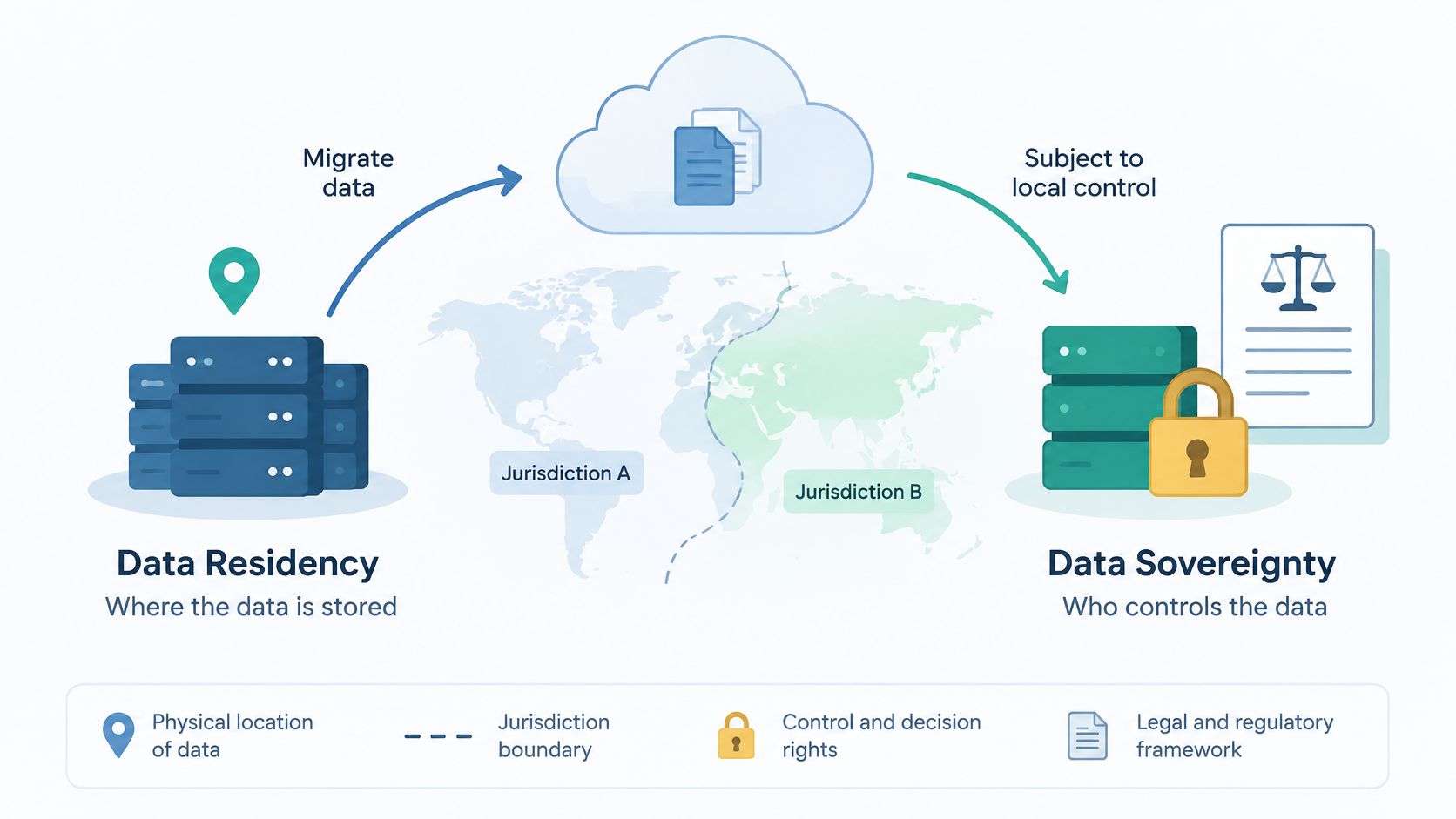
Health-sector research on cloud migration notes that these projects raise questions about where data is located and who controls it, and that healthcare modernisation can involve several overlapping regimes at once, including HIPAA, GDPR and country-specific health-data laws (International Journal of Academic Medicine). Microservices multiply the problem: each service adds storage locations, service-to-service calls and access points that don't exist in a monolith.
| Data location | Residency question | Control to verify |
|---|---|---|
| Primary databases | Is it stored in the permitted jurisdiction? | Region settings in infrastructure code |
| Caches and replicas | Do copies leave the jurisdiction? | Replica regions listed and reviewed |
| Backups and disaster recovery | Does a failover region sit outside the jurisdiction? | Written failover decision approved by compliance |
| Logs and telemetry | Do traces or logs carry personal data abroad? | Log sink region and retention settings |
| Model-training datasets and inference logs | Are training and inference data in the same jurisdiction? | Storage policy covering artifacts and feature stores |
| CI/CD artifacts and build caches | Do build outputs contain sensitive data? | Artifact registry region and access list |
| Developer environments | Are production extracts copied to laptops or other regions? | Data masking rules and environment access review |
| Vendor support access | Can support staff reach data from another country? | Logged, time-limited access with key custody checked |
Regional failover is where the two goals collide. A disaster-recovery region outside the permitted jurisdiction solves availability and breaks compliance in the same move, so that trade-off needs a written decision signed by whoever owns the regulatory risk, not a default checkbox in a console. Government digital teams run into this earlier than most, and a residency checklist for government digital teams is a reasonable starting template.
For AI workloads the boundary is wider than the patient record. Model artifacts, feature stores, inference logs and GPU jobs may need the same jurisdictional controls as the data they were trained on. Teams running hybrid estates should read how hybrid cloud and edge computing work in practice before assuming every store sits in one region.
The standard to meet is simple to state and hard to pass: show continuously, with an audit trail, that sensitive data never leaves the permitted jurisdiction, including through observability and disaster recovery.
Set Governance and Pass the Go or No-Go Gate
Migration risk comes from governance and organisational readiness as much as from infrastructure. A federal cloud-transition survey found that only 1 in 10 respondents described their transition as successful, while 41% called their efforts mixed, problematic or non-existent, with the leading obstacles being security concerns, insufficient skills or expertise (39%) and budget constraints (37%) (Deloitte, Mastering the migration). Those are people and process failures, and a better target architecture doesn't fix any of them.
Set governance in this order, because each step depends on the previous one.
- Assign a business owner to every workload. Not a team, a named person who can approve a cutover date and refuse a scope change.
- Write the controls down. Security, identity, data residency and the regulatory obligations that apply, mapped to specific workloads rather than to the programme as a whole.
- Name a cloud financial owner with a budget. Someone who sees the bill weekly and can explain a variance without scheduling a meeting.
- Train or augment the team before cutover. Skills gaps found on cutover night are the expensive kind, and 39% of respondents named exactly that obstacle.
- Agree measurable exit criteria in advance. Error rate, latency, recovery objectives and rollback duration, with numbers attached and signed off by the business owner.
Who creates the cloud account
Decide before day one whether your team creates the GitHub organisation, cloud account and app store accounts, or the vendor creates them in your name and invites you in. Keep ownership with your organisation either way. Galliot can work inside existing accounts, which is the default, or create them in the client's name on day one.
Legacy dependencies break after the move, not before
An older application that calls a partner service by hardcoded IP address works perfectly until the address changes. Legacy applications that were never designed for cloud environments commonly need integration changes or a partial rewrite to survive the move, so dependency discovery and contract testing belong before the wave rather than in the incident review afterwards.
Then hold the gate. Every application in the inventory carries a path and an owner. Baselines cover at least two normal business cycles. A full rollback has been rehearsed and timed rather than described. Every operating area, including the cloud bill, has a named owner. The residency matrix is signed off for regulated workloads. If any item is open, move the wave, because a delayed wave costs a planning cycle and a wave that lands without a rollback costs the quarter. Where a team lacks platform skills, an outside partner can run the first assessment and build the platform with senior engineers inside your team; Galliot's cloud foundations work covers architecture, migration, Kubernetes, CI/CD and infrastructure as code on AWS, Azure or Google Cloud, or a hybrid with on-premises hardware.
Test, Migrate in Waves and Set Rollback Triggers
A pilot is not a formality. Take one low-risk workload, move it, and use it to prove the runbook, the rollback, the monitoring and the on-call handover end to end. Pick something with real users and no revenue attached, and expect it to run slower than the estimate. Learning that on a pilot is cheap.
Four test types run before any wave goes live, and each answers a different question.
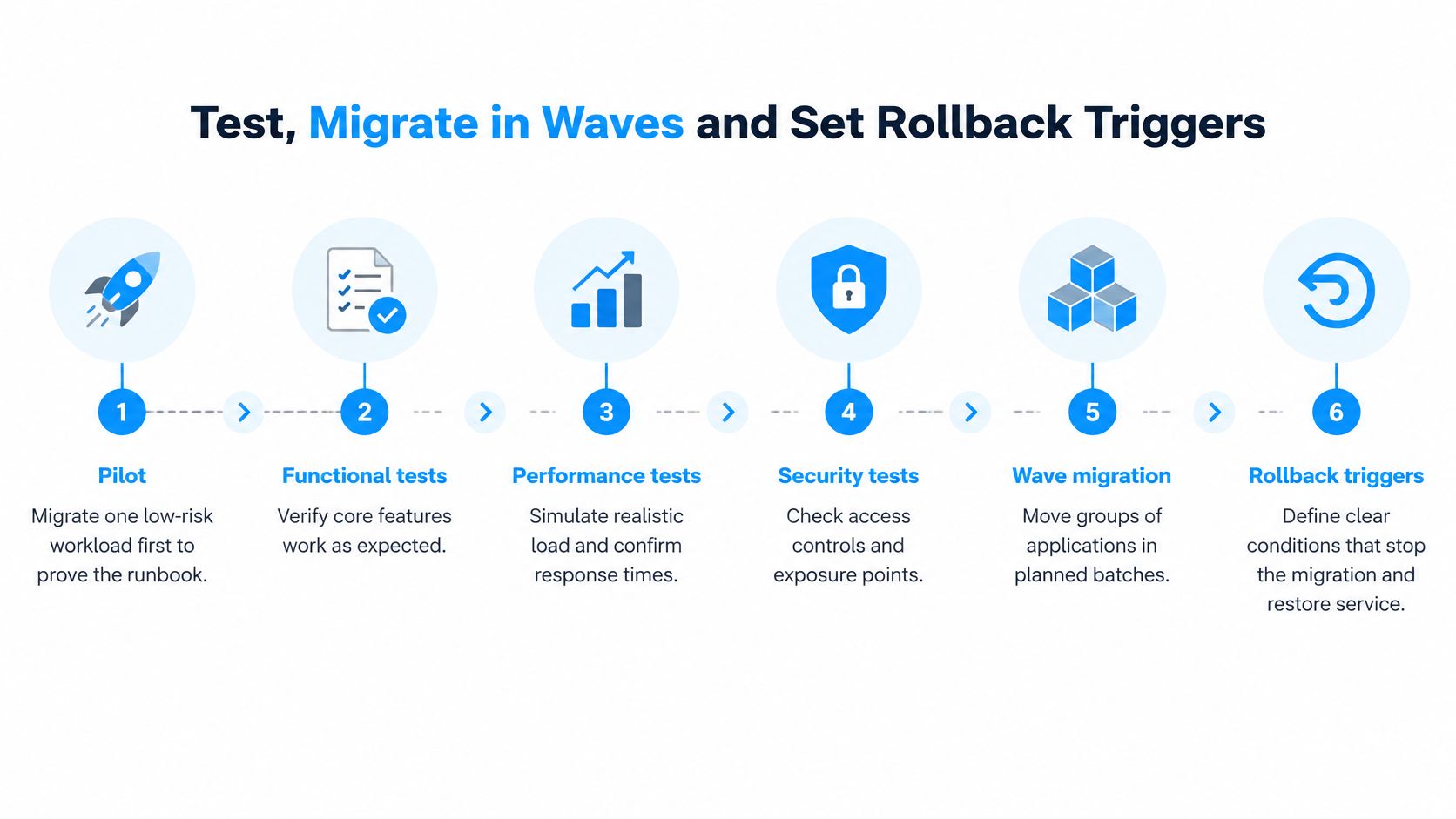
- Functional tests answer whether the application still does what the business expects, including the exports and reports nobody exercises until the end of the month.
- Performance tests answer whether it holds under realistic load, not a smoke test with three concurrent users and a warm cache.
- Security scanning with an access review answer whether you've opened a port, a bucket or a role that wasn't open before, and whether the old firewall rules still mean what they meant.
- A rollback drill answers whether the plan works after the deployment has already been reversed once and the data has moved underneath it.
Group the remaining applications into waves by dependency, never by which team shouts loudest. A reporting service that reads three databases belongs in the same wave as the last of those three. A shared authentication change ships before any wave that depends on it, or it ships in none. Each wave has to hold at its exit criteria before the next one opens.
| Exit criterion | What it protects against | How to measure it |
|---|---|---|
| Error rate | Functional regression after cutover | Compare with the pre-migration baseline |
| Latency | Slower responses under real traffic | Compare p95 under peak load against the baseline captured before cutover |
| Recovery time objective | Outage longer than the business accepts | Time a restore in a rehearsal |
| Recovery point objective | Data loss beyond the accepted window | Check the backup age at restore |
| Rollback duration | Reversal that takes longer than the window | Time a full rollback drill |
A trigger has to be a number agreed before cutover, not a feeling in the bridge call. If error rate on the migrated service stays above its pre-migration baseline for the window written into the runbook, you roll back and re-plan, and one named person holds the authority to pull it without a committee.
Rollback reverses more than the deployment. Upstream and downstream configuration moves back, DNS records change again, and any data written during the cutover window has to be reconciled before the old system resumes as the source of truth. Then you retest, because a system restored to its pre-migration state is not automatically the system you started with.
Rehearse the full rollback before the cutover and put a stopwatch on it. That duration is the figure you commit to in the runbook, and it's the number the business owner signs off.
Who Owns the Application After Go-Live
Go-live ends the project and starts the part that decides whether any of it was worth doing. A deployment that passes every test can still fail operationally through a broken integration, incomplete monitoring or unreconciled records, and none of those show up in the release notes.
Google Cloud's own migration execution guidance treats dependency mapping, testing, validation, governance, team composition and workload-specific rollback as separate execution requirements rather than optional checklist items, and a failed cutover can require reversing upstream and downstream configuration as well as the deployment itself (Google Cloud migration execution guidance). That is a day-2 problem, and it needs a named owner per area.
| Operating area | Owner to name | Check at each review |
|---|---|---|
| Application releases | Product or engineering lead | Deploy and rollback steps are documented and current |
| Cloud bill | Cloud financial owner | Monthly spend against the migration budget |
| Observability and alerts | Platform or DevOps team | Every alert has a named responder |
| Incident response | On-call engineer with an escalation path | Last incident reviewed and documented |
| Rollback decisions | Business owner with engineering lead | Thresholds still match the baseline |
| Data reconciliation | Data owner | Record counts and lag match between old and new systems |
Dual running needs an end date
Decide how long the old system stays live and what event triggers its shutdown. Keeping both running indefinitely doubles cost and muddies which copy holds the truth, and the longer the overlap the more expensive the reconciliation gets. A stated exit condition, such as 30 days of matched record counts and one clean month-end close, beats an open-ended safety net.
Reconcile record counts and replication lag on a fixed schedule. Healthcare and other high-availability applications carry the highest risk here, because a partially migrated patient record can pass every technical check and still be clinically wrong.
For the first 30 days, run a fixed checklist: watch error rate, p95 latency and queue depth against baseline for the first three days and no releases except regression fixes; reconcile record counts and confirm backups restore into the new environment rather than merely existing; hold the first cloud cost review against the migration budget and delete orphaned resources from the old estate; then retire or schedule retirement of the old system and update the runbook with what happened.
Galliot keeps ownership on your side, with the repository, cloud and app store accounts in the client's name, and supports the operational half through monitoring, logging and alerting the client's team can act on plus regular reviews of cloud spend, with 24/7 coverage behind it. That's what our cloud and platform engineering service is built to do.
If the pattern in this guide sounds familiar, the fix usually starts earlier than the next cutover: an inventory with one path per application, baselines that make rollback measurable, and a named owner for the app, the bill and the alerts. Galliot's engineers run that assessment with your team, build the cloud foundations and platform with senior engineers inside your existing accounts, and stay through the day-2 work that decides whether the migration holds. Tell us what you're moving and we'll start with the short list of what to fix first at Galliot.
Get Started
Have a question? Send us a message and we will respond as soon as possible.
Leave us a comment