Modernizing Legacy Systems: A Step-by-Step Guide
Federal agencies planned to spend more than $90 billion on information technology in fiscal 2019, and about 80 percent of it, roughly $72 billion, went to operating and maintaining systems that already existed rather than building anything new, according to the U.S. Government Accountability Office. That split is the modernization problem in one line: when the run bill takes four dollars in five, cloud migration, architecture renewal, automation and new digital services all fight over the remainder.
The systems being kept alive aren't all ancient by accident. The same review examined 65 legacy systems identified by 24 federal agencies, selected the 10 most critical for modernization, and found they ranged from 8 to 51 years old, spanning the Department of Defense and the Treasury.
So the useful question about any legacy system isn't how old it is. It's what it costs to keep running, what breaks if it fails, and who still understands it. Keeping a system is a legitimate outcome whenever the evidence supports it.
Why Legacy Systems Cost More Than They Look
The cost hides in the operating pattern. Licenses invoice per line item, vendor support renews, and internal staff time disappears into overhead. A 2016 GAO review of federal IT made that pattern explicit: the government invested more than $80 billion a year in information technology, and 5,233 of approximately 7,000 investments spent all of their funding on operations and maintenance, reporting nothing for development, modernization or enhancement. The review also found systems running components at least 50 years old, including hardware and software whose vendors had stopped supporting them.
Age matters only when it removes support, skills, or safe change. A younger system with unsupported components, undocumented interfaces, and one remaining expert can cost more to steady than an older system with clean documentation and predictable maintenance. The practical test is what the system consumes now, what failure would interrupt, and how much room the team has to change it without losing data or control.
The run bill deserves the same attention as the build plan. It recurs whether the roadmap moves or stalls, and it buys no new capability. That is why keep-versus-modernize should be settled before anyone picks a target architecture. Some systems earn continued maintenance because their failure cost is high, their change rate is low, and their interfaces are stable. Others become replacement candidates when support expires, workarounds multiply, or the same small group absorbs every fix.
Measure your own split
Take your trailing twelve months of IT spend and separate it into run-and-maintain against change-and-build. Include vendor support renewals, license fees, hosting, and the loaded cost of engineers whose main job is keeping systems alive. Express the run share as a percentage, then compare it with the federal pattern in the opening.
Next, compute each system's annual run cost on its own. Add license and vendor support fees, staff hours, and hosting, then write the total beside the system. That figure makes the ranked list later worth arguing about: a risk score with a dollar figure attached survives a steering committee, and a risk score alone rarely does.
The three questions that settle every legacy decision: what does this system cost to keep, what breaks if it fails, and who still understands it.
If you want a second opinion on sequencing before committing budget, the legacy app modernization roadmap from Arch walks through assessment, prioritization and execution in that order.
Score Each System on Seven Criteria Before Ranking
Rank systems by risk and value, not by age. Each criterion below gets a score from 1 (low risk or low value) to 5 (high), and the weighted total decides the queue.
| Criterion | Weight | Score high when | Score low when | Evidence to gather |
|---|---|---|---|---|
| Business criticality | 3 | Outage stops revenue, patient care or compliance reporting | Used by a small team with a workable manual fallback | Process owner interviews and incident logs |
| Cost of failure | 3 | Data loss, patient-safety event or regulatory penalty | Minor delay with a manual recovery path | Incident history and SLA terms |
| Change frequency | 2 | Changed monthly or more often | Untouched for years | Commit history and release tickets |
| Security exposure | 2 | Internet-facing with unpatched components | Internal, isolated and currently supported | Vulnerability scans and patch records |
| Integration burden | 2 | Many point-to-point interfaces with no documentation | Few stable, documented interfaces | Interface inventory |
| Staff availability | 2 | Only one or two people understand the code | Knowledge documented and shared across the team | Skills map by name and tenure |
| Vendor support status | 1 | Vendor has ended support | Current support contract in place | Vendor lifecycle notices |
Multiply each 1 to 5 rating by its weight, sum the seven products, and sort descending. The weights total 15, so a weighted score runs on a maximum of 75. Business criticality and cost of failure carry double the influence of change frequency, exposure, integration burden and staff availability, and triple that of vendor support status, because an unsupported system nobody depends on is a cleanup task, not a migration.
Collect evidence, don't estimate
Every score needs a source behind it. Pull criticality from process owners in interviews, not from the org chart. Pull change frequency from commit history and release tickets for the last twelve months. Vulnerability scans and patch records settle exposure. An interface inventory settles integration burden, and a skills map with names and tenure settles staff availability. Incident logs and SLA terms give you cost of failure, and vendor lifecycle notices give you support status.
The ranking logic then almost writes itself. Systems scoring high on criticality and risk rise to the top. Old but stable, rarely changed, low-exposure systems drop, however old they are.
A 30-year-old annual tax batch job that nobody has modified in six years can carry less risk than a three-year-old customer portal with weekly releases, no automated tests and four undocumented point-to-point integrations. Age tells you almost nothing about either one.
Treat the scores as a starting position. Validate them with domain owners and production telemetry before anyone commits budget, because a score built from interviews alone will reflect whoever was most confident in the room.
The output is a ranked list, the top three systems flagged for deeper analysis, and one dominant risk written next to each. Add one hard override: flag any system rated 5 on business criticality with no documented rollback path, whatever its total. The weighted score averages that fatal condition away, and an average is exactly what you can't afford there.
When Controlled Maintenance Beats Modernization
Some systems should stay where they are this year, and saying so out loud is part of the job. Survey evidence reported in the 2025 State of Legacy Software Modernization Report found that 62% of U.S. organizations still rely on legacy systems, with the leading barriers being budget constraints, fear of disrupting operations, and the belief that existing systems still work.
That third barrier deserves respect rather than a sales pitch. Replacement raises operational risk when the business rules are undocumented, test coverage is thin, and the only people who can prove behavioral equivalence are the two engineers who built the thing.
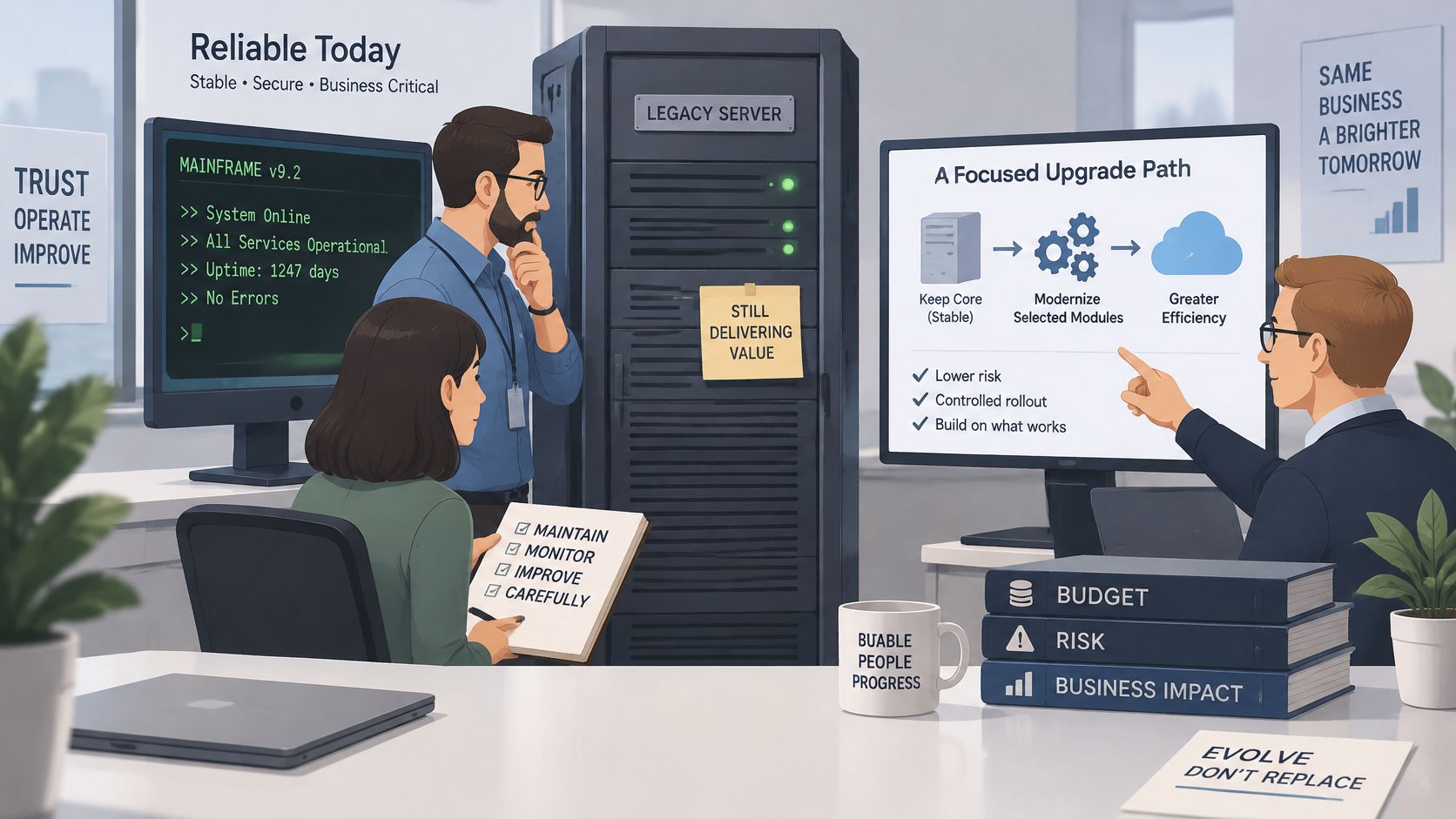
A stable, rarely changed, highly specialized system with low exposure is a candidate for controlled maintenance, not a rewrite. What that commits you to is concrete:
- A patch and support schedule with owners named, so renewals don't slip past their dates.
- Monitoring with alert thresholds, because a system you've decided to keep still has to fail loudly.
- A written runbook covering recovery steps, batch dependencies and known workarounds.
- Knowledge capture from the few people who understand the code, recorded while they're still there.
- A dated review, say every two quarters, that re-examines the criteria rather than renewing forever.
The triggers that end maintenance
Maintenance stops being defensible when one of these appears:
- The vendor ends support, leaving you with unpatched infrastructure and no upgrade path.
- A security finding has no available fix, so the exposure can't be closed where the system sits.
- One or two people hold all the knowledge and one of them has handed in notice.
- Annual maintenance cost climbs year after year without any corresponding capability gain.
- Every new integration needs a manual workaround, which means the system is already blocking work elsewhere.
Keep the decision legible. A system with no trigger present gets a dated review and a named owner, not an automatic rewrite. A system with a trigger gets prioritized against everything else on the ranked list, using the same evidence.
Pick Wrap, Refactor, Replatform or Replace per Component
The option belongs to the component, not to the system. One application can reasonably carry all four at once.
| Option | Use when | Main risk | First move |
|---|---|---|---|
| Wrap or encapsulate | Logic is sound but locked behind old interfaces | Wrapper hides coupling that still needs fixing | Put an API in front and log every call |
| Replatform | Code works but the runtime, OS or database is unsupported | Behavior shifts on the new platform | Move the same code to a supported platform with characterization tests |
| Refactor | Code is the constraint, change is frequent and tests exist or can be added | Slow progress and scope creep | Extract one module behind tests |
| Replace | Function is well understood, coupling is low or a supported product exists | Undocumented business rules get lost | Replace one capability at a time with a parallel run |
Appetite for moving work to the cloud is high. In 2024, 81% of IT leaders surveyed across Western Europe and the United States said they anticipated migrating business-critical applications to the cloud, per Mechanical Orchard's survey of 150 organizations. Appetite isn't a plan, and migration is only one of the four routes above.
The analysis workflow
Begin with structural analysis, not with a rewrite estimate.
- Inventory applications and interfaces, including the batch jobs and file transfers nobody listed.
- Parse source and configuration into a dependency graph so you can see what calls what.
- Classify components by business criticality, change frequency, security exposure, runtime obsolescence and test coverage.
- Remove or quarantine dead functionality before it inflates the estimate.
- Write characterization tests around undocumented behavior, capturing real inputs and current outputs.
- Assign an option per component, with a named owning engineer and a dependency count.
Evidence behind step two: CAST-reported analysis cited by IBM found that technical-debt repair in the United States runs at about 2.07 workdays per 1,000 lines of code, and that an initial deterministic analysis can reduce effective modernization scope by roughly 30% by exposing dead code, duplication and redundant components. Treat that 30 percent as a possible outcome to validate against telemetry, never as a savings guarantee you put in a proposal.
The main failure is mistaking code volume for effort. A small, tightly coupled batch scheduler can dominate your risk profile, while millions of lines turn out to be low-value residue that could be switched off. Size each component against the 2.07 workdays per 1,000 lines figure as an order-of-magnitude check, not a quote.
Reuse the seven ranking criteria at component level rather than inventing a second scale. A component inherits the criticality, change and exposure ratings of the system it sits in, which keeps the whole portfolio comparable. For a cloud migration track, these application migration patterns map onto the same four options.
The deliverable is a per-component list where every line carries an option, an owner, a dependency count and the test that must pass before anything changes. A component with many upstream consumers is a poor first slice even when the option is right. We start engagements from a client's existing code or an AI-built prototype only after reviewing it and telling them what to keep and what to rebuild.
Run a Strangler Sequence One Slice at a Time
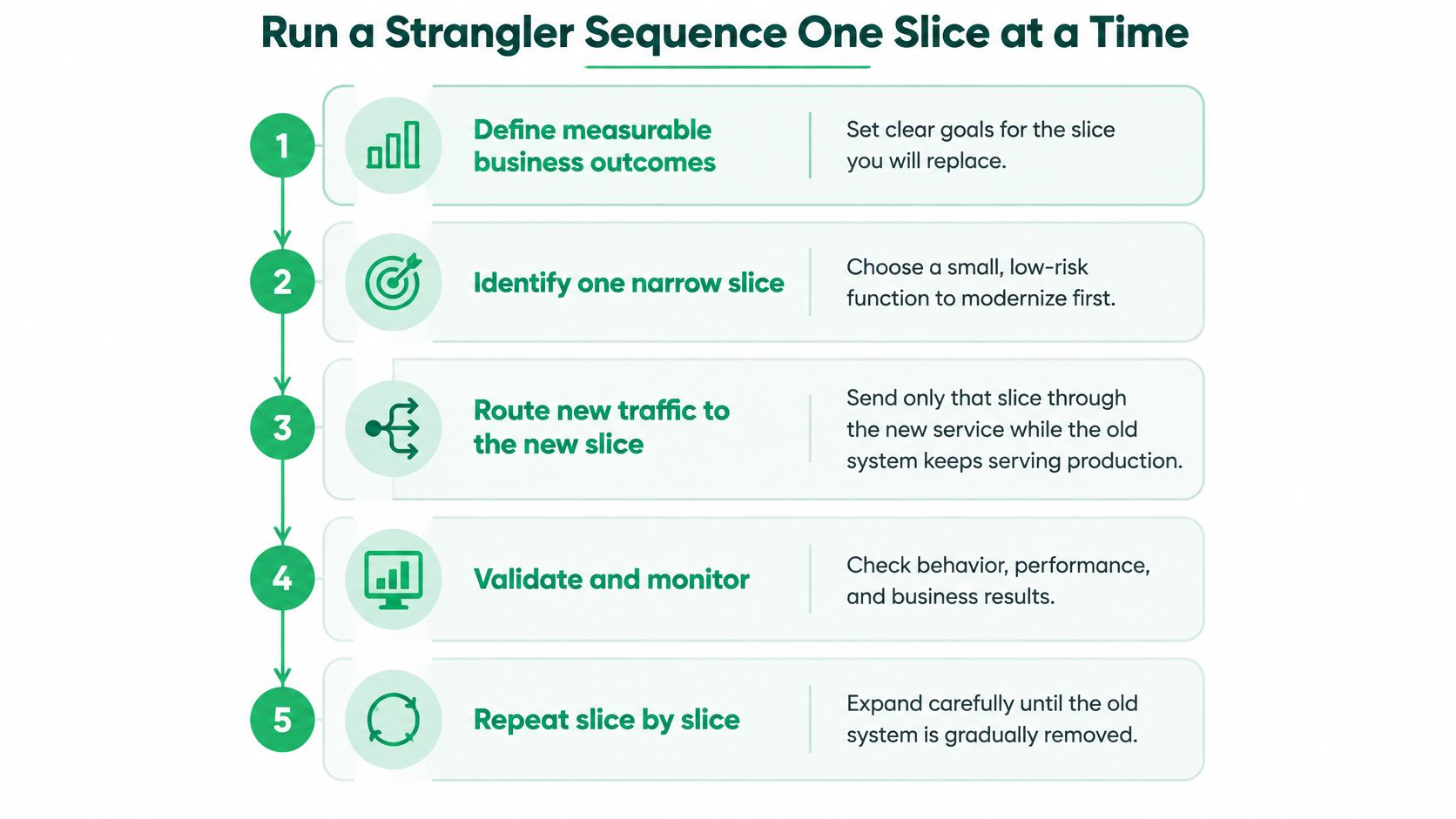
Avoid the wholesale rewrite. Replace one slice while the old system keeps serving production, and repeat. That sequence, described as the strangler fig pattern by Martin Fowler, has a fixed order of work:
- Define measurable business outcomes for the slice before you touch code.
- Map domains, dependencies, data flows and system seams.
- Place an API or routing facade in front of the legacy application so callers stop talking to it directly.
- Select an independently deployable, low-risk capability as the first slice.
- Build the replacement beside the legacy implementation, not instead of it.
- Run shadow or parallel verification, comparing outputs record by record.
- Shift production traffic gradually, keeping a tested rollback route at every step.
- Retire the old slice only after functional, performance, security and reconciliation tests pass.
Step 2 is runtime seam mapping, not a static diagram. Which entry points carry traffic, which batch jobs read which files and queues, and where a facade can route calls without changing a single caller. Fowler's methodology holds four control points: outcomes, decomposition, delivery and organizational change.
Where the sequence goes wrong
- Hidden coupling in the first slice, usually a shared database table that two teams write to.
- Moving data ownership too early, before the new side has proven it writes correctly.
- No rollback route, or one nobody has rehearsed since the design review.
- Ignoring compatibility behavior users depend on, such as output formatting, rounding, or the order records appear in.
Organizational change is the control point teams skip. Before cutover, name the team that will own the slice afterwards, the person who approves each traffic shift, and the runbook the on-call engineer follows at 2 a.m. Plan the knowledge transfer from the two people currently operating the legacy slice while they're still on the project, not after the retirement date is announced.
Practical rule: a slice that doesn't improve at least one target metric isn't finished, even if it works.
Record the baseline for all seven measures below before the first slice, store them beside the cutover plan, and write the rollback rehearsal into the schedule.
| Metric | How to measure it | Direction after each slice |
|---|---|---|
| Deployment frequency | Releases per week for the slice | Should rise |
| Change-failure rate | Failed changes divided by total changes, per slice | Should fall |
| Mean time to recovery | Average hours from incident start to restoration for the slice | Should fall |
| Latency | p95 response time on the slice's production entry points | Should not get worse |
| Defect rate | Defects found per release, split by severity | Should not get worse |
| Reconciliation accuracy | Matched records as a share of records compared in the daily dual-run job | Should reach full agreement before traffic shifts |
| Infrastructure cost | Monthly hosting and cloud bill attributed to the slice | Should fall once the legacy path is retired |
| Maintenance effort | Engineer hours spent on the slice each month | Should fall |
Tracking these before and after turns modernization from a story about finishing into a story about results. The team practices around that baseline is exactly what the DevOps practices guide covers, and it matters more than the choice of runtime. If you're planning a system replacement rather than a slice, the Glanser test och lansering av nytt affärssystem sets out the cutover and acceptance work in the same order.
Protect Data and Integrations During a Phased Move
Applications move; data disagrees with itself. Government research reported by GovExec found 66% of respondents struggled with data silos and another 66% named legacy-system integration as their top technical challenge, with 49% citing funding limitations. The hardest work isn't lifting workloads, it's building dependable seams between old and new.
Order the interfaces before rewriting anything. Rank each one by transaction volume, times the number of downstream consumers, times data sensitivity, then stabilize the top five first. Leave low-volume, single-consumer interfaces until the record-keeping pattern is proven.
When the legacy system is the record
The stuck question is usually this: the legacy system is the authoritative record, and the modern platform needs real-time access to it. The answer is a middle layer, not a synchronized second database.
Keep the legacy system as the system of record. Put the new custom logic in a layer that sits between the client's tools and the record, so the custom code lives there and the record stays clean. The middle layer does the work and writes the result back, which keeps the record authoritative and the logic replaceable. That is how we build these systems at Galliot: the CRM stays the system of record, and the surrounding platform handles the work.
Record field-level ownership for the legacy record. The moment that ownership is vague, the middle layer becomes a second source of truth and reconciliation stops being possible.
The controls a phased move needs
- Contract tests per interface so a schema change breaks a test, not a nightly batch.
- A deliberate read versus write decision. Dual reads are safe; dual writes diverge the first time one side fails.
- Reconciliation jobs each cycle comparing record counts and field values, not just totals.
- Rollback criteria written before cutover, stating the threshold that sends traffic back.
- Data-quality thresholds agreed with domain owners, expressed as measurable numbers rather than a feeling.
For healthcare and other regulated workloads, add audit trails, equivalent access controls, and a dual-run period for high-impact transactions before the legacy path is decommissioned.
Before the first cutover, have three things written down and signed: the interface contracts, the reconciliation checks, and the rollback trigger. Teams that scale enterprise software development around these artifacts ship phased migrations without ever freezing the business.
Confirm the First Slice Before You Commit Budget
Work the next five actions in order and you'll have a defensible starting point rather than a slide deck.
- Choose the highest-ranked system from the scoring table that also has one clear business outcome.
- Record the outcome metric and its current baseline, taken from the metrics table above.
- Assign one option (wrap, replatform, refactor or replace) and name the first slice explicitly.
- List the interface contracts and reconciliation checks the slice must pass before traffic moves.
- Set the rollback trigger and a date for the first review, on the calendar, with a named owner.
If your team doesn't have the capacity to run the assessment, the practical starting move is a call with a Galliot engineer, who reviews your infrastructure, pipelines and cloud bill and agrees a short list of what to fix first. Make the engagement prove its worth: when it ends, the platform should be documented and handed to your team so you can run it without outside help, or extended with you by choice.
The strategic IT upgrade for Midlands firms is useful reading for anyone weighing the business case before signing anything.
The rule that survives contact with reality: modernize in slices, measure each one against a baseline recorded beforehand, and keep what's stable.
Galliot builds and maintains the platforms that replace legacy slices, and when an engagement ends the platform is documented and handed to your team to run, or extended with you. If you're weighing keep against modernize, bring your ranked list and we'll review the cost, the failure modes and the seam that has to hold first. Visit Galliot to start that conversation.
Get Started
Have a question? Send us a message and we will respond as soon as possible.
Leave us a comment